

comrce cloudprint for API partners
Does a partner app print through your account, for example shipping labels from a marketplace connector? Then you need to reconnect that partner once in comrce cloudprint. Your share from DRUCKERWOLKE doesn’t carry over.
It takes three steps:
- Create the share. In comrce cloudprint, choose the partner and set an API password for it.
- Send the credentials. Give your partner your account ID and the API password.
- Your partner switches over. It then sends your print jobs to comrce cloudprint.
What changed
Section titled “What changed”comrce cloudprint is the successor to DRUCKERWOLKE. The functions are the same, but it’s a separate system:
- New address:
cloudprint.app.comrce.ioinstead ofapp.druckerwolke.de. - New sign-in: you sign in through comrce Hub, not with your DRUCKERWOLKE details.
- New account: you get a new account with a new account ID.
- Nothing carried over: settings and shares from DRUCKERWOLKE aren’t taken across.
Until a new share exists and your partner has switched over, its jobs don’t reach your printers.
Billbee isn’t affected. You connect Billbee directly in Billbee, as described in Print Billbee invoices and labels automatically.
Before you start
Section titled “Before you start”- Administrator rights in comrce cloudprint. You get them at your first sign-in to comrce cloudprint as Owner of the organization in comrce Hub. Other members don’t see the gear at the top right. A later role change in comrce Hub isn’t applied automatically. In that case, contact comrce support.
- Your partner is activated in comrce cloudprint. Only then does it appear in the partner list. If it’s missing, contact your partner or comrce support.
Step by step
Section titled “Step by step”-
Go to comrce cloudprint. Open
cloudprint.app.comrce.ioand sign in through comrce Hub. Choose the organization you want to print for. -
Open the menu. Select the gear at the top right, then Einfachen API Zugriff (simple API access).
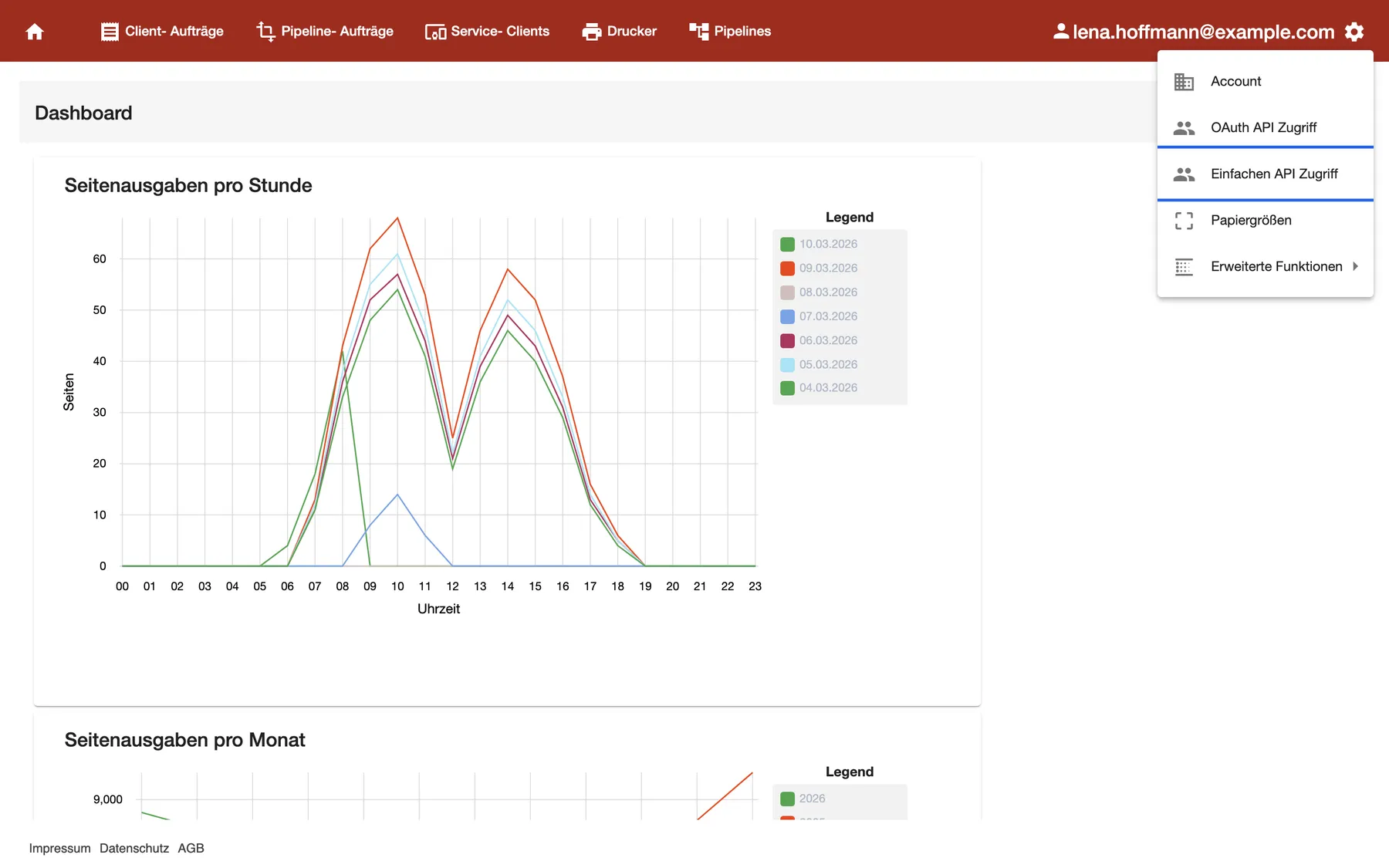
The gear at the top right leads to your partner shares. What this screenshot shows
- Screen
- Dashboard
- Highlighted
- “Einfachen API Zugriff”: opens the list of partner shares
- Also visible
- Settings menu: Account, OAuth API Zugriff, Einfachen API Zugriff, Papiergrößen, Erweiterte Funktionen; The gear only shows for administrators
- Purpose
- where partner shares are set up
-
Create a new share. On the screen Einfache API Zugriffe (simple API accesses), select the +. The window Einfache API hinzufügen (add simple API) opens.
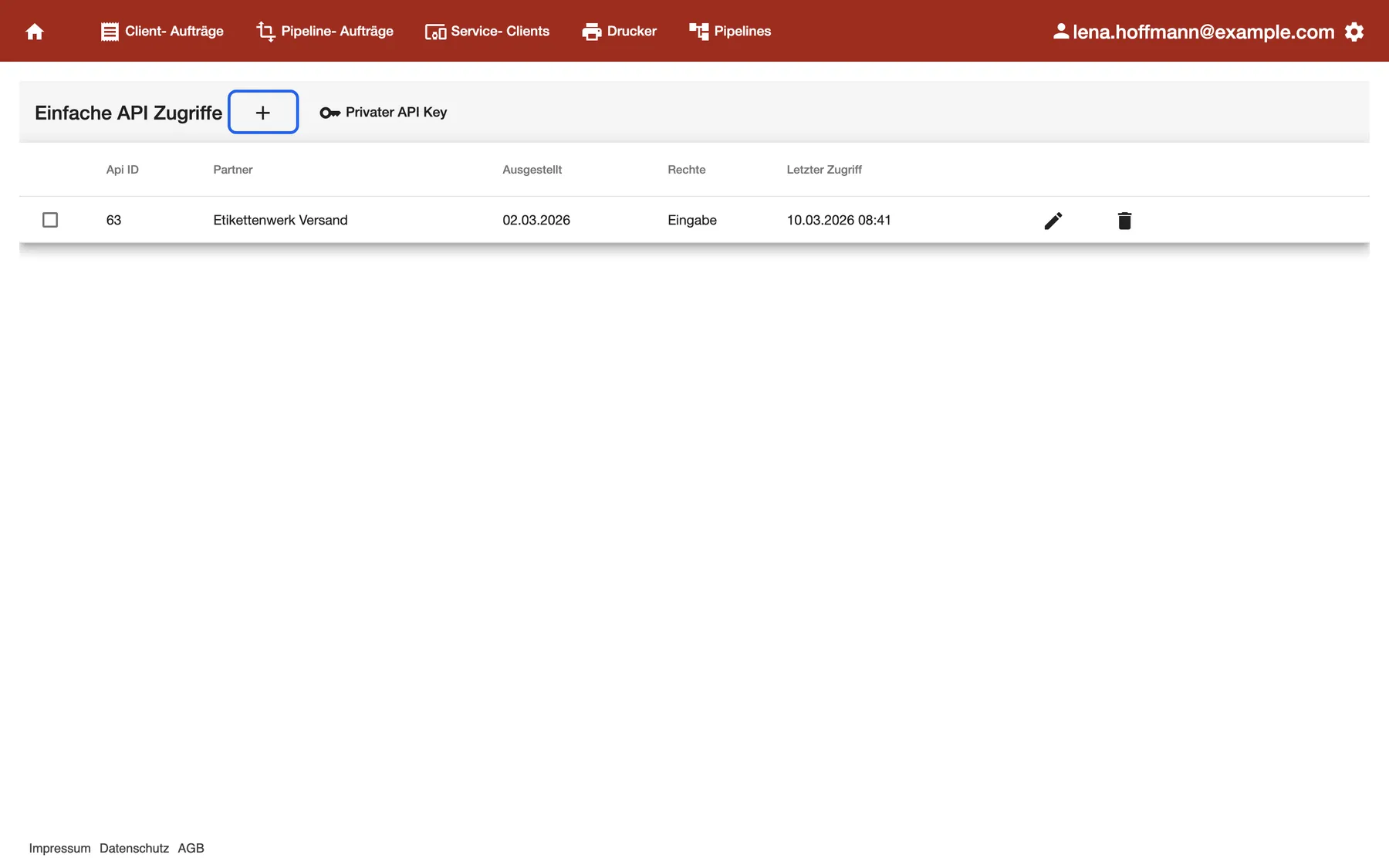
The plus next to the title creates a new share. What this screenshot shows
- Screen
- Einfache API Zugriffe
- Highlighted
- “Neue Freigabe erstellen”: opens the window for a new share
- Also visible
- One existing share for Etikettenwerk Versand; Columns Api ID, Partner, Ausgestellt, Rechte, Letzter Zugriff
- Purpose
- create a share for a partner
-
Fill in the form.
- API- Partner: choose your partner from the list.
- Benutzername (user name): your comrce cloudprint account ID. It’s filled in and can’t be changed. Note it down for the next section.
- Passwort setzen (set password): a new, strong API password for this partner only. It’s not your comrce Hub password and should differ from it. Each partner gets its own API password.
- Berechtigungen (permissions): tick what your partner names. For printing labels and documents, Eingabe (input) is usually enough.
Permission What it allows Allgemein (general) Statistics, metrics and registering webhooks Eingabe (input) Placing documents, reading the input endpoints and checking the job status Ausgabe (output) Registering as a Service Client and creating webhooks Verwaltung (management) Access to the whole account Archiv (archive) Access to the internal archive 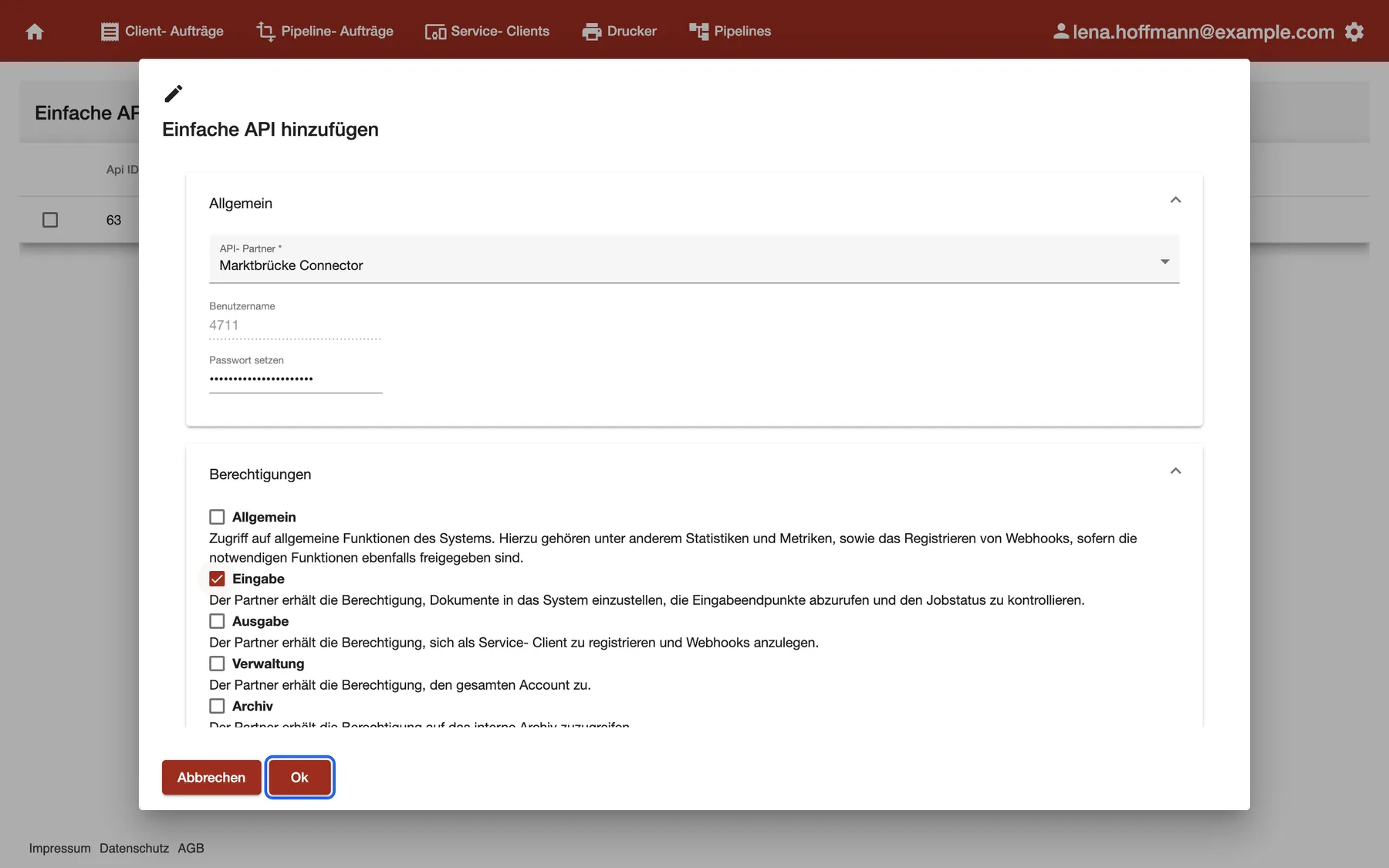
Choose the partner, set an API password and tick what the partner needs, usually Eingabe. What this screenshot shows
- Screen
- Einfache API Zugriffe
- Highlighted
- “Ok”: saves the share
- Also visible
- API- Partner: Marktbrücke Connector; Benutzername: 4711, greyed out; Passwort setzen: hidden; Berechtigungen: only Eingabe ticked
- Purpose
- fill in a share for a partner
-
Save. Select Ok. The share now appears in the list. The Api ID in the list isn’t your account ID.
The password isn’t shown again, so keep it somewhere safe until you’ve sent it.
Send the credentials to your partner
Section titled “Send the credentials to your partner”Your partner isn’t told about the share automatically. Send it these yourself:
- Your comrce cloudprint account ID, from the field Benutzername.
- The API password you set for it.
Use the channel your partner specifies, and don’t put the account ID and API password in the same message. Never pass on your comrce Hub password. Your old DRUCKERWOLKE credentials no longer work in comrce cloudprint.
What your partner changes
Section titled “What your partner changes”Your partner handles the switch on its side. For your information, this is what changes for it:
| DRUCKERWOLKE | comrce cloudprint | |
|---|---|---|
| API address | app.druckerwolke.de/apiv1/ | cloudprint.app.comrce.io/apiv1/ |
| API key header | X-Api-Key-DruckerWolke | X-Api-Key-comrce-CloudPrint |
| Partner’s API key | previous key | set up by comrce, usually the previous one |
| User name | previous account ID | new account ID from you |
| API password | previous API password | new API password from you |
The interface itself stays the same.
If something doesn’t work
Section titled “If something doesn’t work”| What you see | Cause | What to do |
|---|---|---|
| The gear at the top right is missing | You have no administrator rights in the comrce cloudprint account | Ask the Owner of the organization in comrce Hub to create the share |
| Your partner is missing from the list API- Partner | The partner isn’t activated for comrce cloudprint yet | Contact your partner or comrce support |
| Ok does nothing, and the window stays open without a message | No partner is selected, or this partner already has a share. The app’s reply Authorization already defined. doesn’t appear on the screen | Check the partner. If it has a share, select Abbrechen (cancel) and edit that share with the pencil |
Your partner reports X-Api-Key-comrce-CloudPrint header is not set. | Your partner still sends the old DRUCKERWOLKE header | Point your partner to the header X-Api-Key-comrce-CloudPrint |
Your partner reports Api key is not valid | Your partner’s key isn’t set up in comrce cloudprint | Refer your partner to comrce support |
Your partner reports Unknown credentials | The account ID or API password is wrong, often still the old DRUCKERWOLKE details | Set a new API password in the share and send it again with the new account ID |
Your partner reports This api key is currently locked due to too many login attempts. | The partner’s API key has more than 50 failed sign-ins. The count covers all customers of this partner and doesn’t start over by itself | Check the credentials and contact comrce support |
| No jobs arrive, although everything is set up | Your partner still sends to DRUCKERWOLKE | Ask your partner to confirm the switch |
Check the connection
Section titled “Check the connection”The column Letzter Zugriff (last access) shows when your partner last signed in with this share. Reload the list to see the current value.
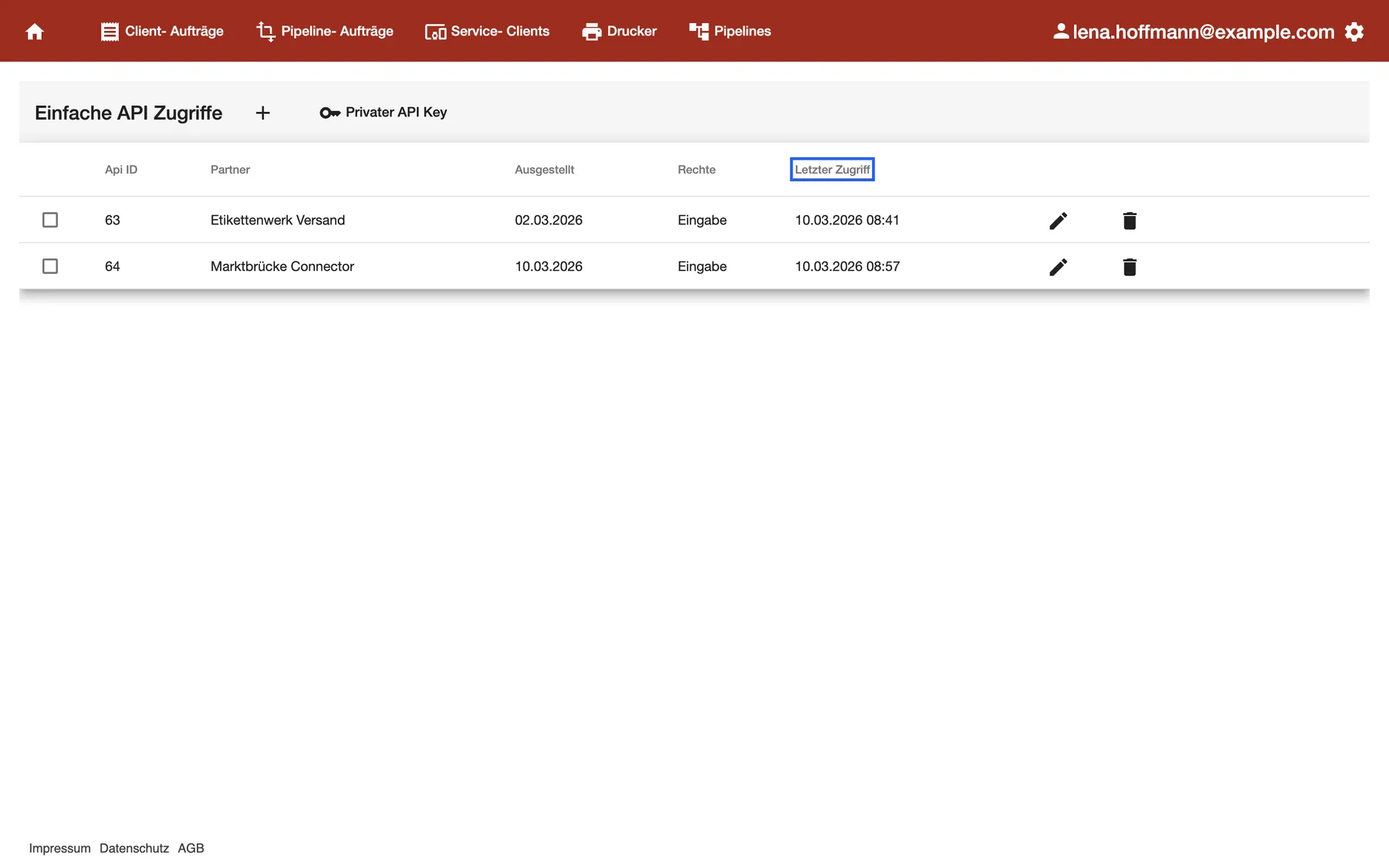
What this screenshot shows
- Screen
- Einfache API Zugriffe
- Highlighted
- “Letzter Zugriff”: shows the partner's last sign-in with this share
- Also visible
- The new share 64 for Marktbrücke Connector; Pencil and bin at the end of each row
- Purpose
- check that the partner reaches comrce cloudprint
A new share starts with the time you created it. A later time means your partner’s sign-in works. It doesn’t prove that a document printed: for that, look in Pipeline jobs.
End a share
Section titled “End a share”Select the bin in the share’s row. A window titled API deaktivieren (deactivate API) asks first. There, select Ok.
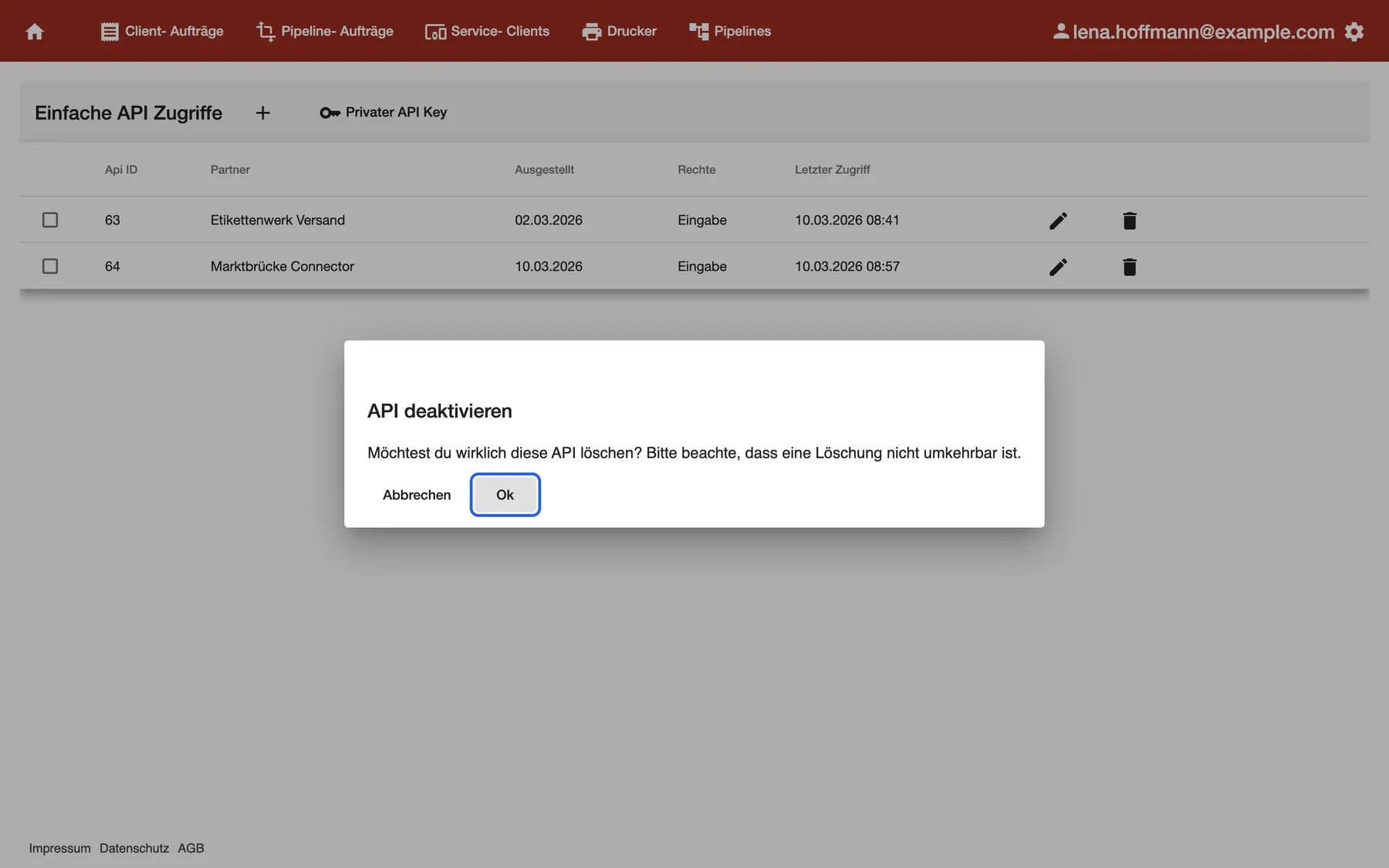
What this screenshot shows
- Screen
- Einfache API Zugriffe
- Highlighted
- “Ok”: deletes the share
- Also visible
- Dialog title API deaktivieren with the warning that a deletion can't be undone; Abbrechen and Ok buttons
- Purpose
- end a share
The deletion can’t be undone. To connect the partner again, create a new share.